One Primary Owner Per Profile: The GBP Ownership Mistake Behind Lost Clients
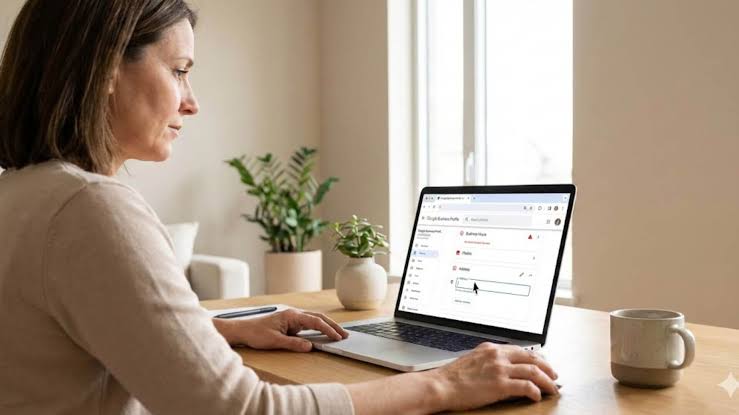
A plumbing company fires its marketing agency, and then the owner tries to update his holiday hours on Google and can’t. The agency set up the listing three years ago, verified it under an agency email, and never handed it over. His business, his reviews, his phone number on Google Maps. Someone else’s login.
That’s the GBP ownership mistake, and it happens more often than it should. Nobody plans it; it builds up one client setup at a time, and nobody asks who controls the listing until a relationship ends badly.
Google’s access roles make the whole thing preventable at onboarding and fixable later, provided someone on the account knows which role can do what.
What Counts as the GBP Ownership Mistake
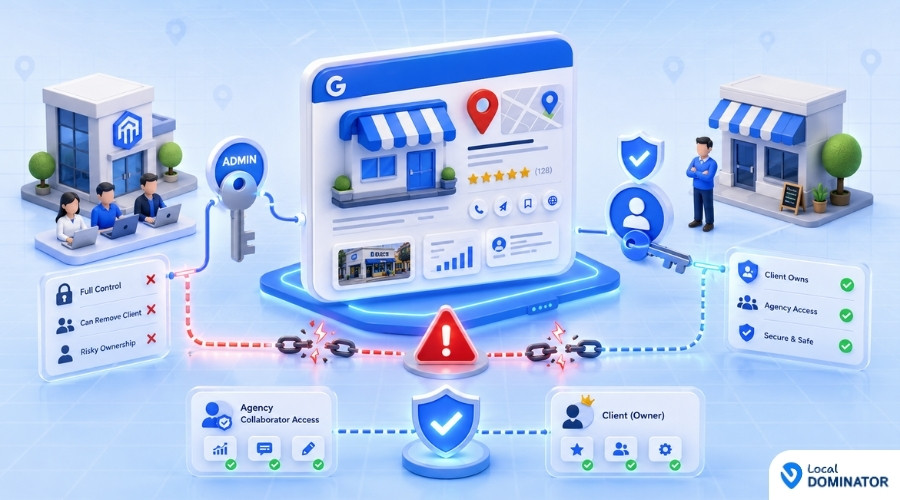
The GBP ownership mistake is an agency holding Owner or primary owner access to a client’s Google Business Profile instead of Manager access. The client should own the listing. The agency should be added as a Manager, which covers the day-to-day work without giving the agency power to remove the client or delete the profile.
That can sound like a technicality until a contract ends, because ownership decides who can lock whom out.
GBP Ownership Roles: Primary Owner, Owner and Manager
Google’s Business Profile Help documentation lays out three roles, each with a different level of power.
What a Primary Owner Controls on a GBP Listing
A profile can have multiple owners but only one primary owner. The primary owner can’t remove themselves until primary ownership is transferred to someone else, and only the primary owner can make that transfer. Think of this as the deed to the listing.
What Owners Can Do on a GBP Listing
Owners have full control. They can add or remove users, change other users’ access roles, manage profile information, and delete the profile entirely. Only owners can remove other owners and managers, and a newly added owner has to sit through the waiting period covered below before doing it.
What Managers Can Do and Why Agencies Belong There
Managers, formerly called “site managers,” get mostly the same access as owners. They can edit business information, publish posts, and respond to reviews, but they can’t add or remove users, and they can’t remove the profile.
Posting, review replies, hours, services, photos, and performance reporting all sit inside Manager access, which covers almost everything an agency does week to week.
How the GBP Ownership Mistake Happens
Most agencies never decide to own client profiles. They get there through shortcuts:
- The agency creates the listing during onboarding and verifies it under its own Google account because the client is slow to respond.
- The client hands over their Google login instead of adding the agency as a user.
- A past freelancer claimed the profile years ago, and the new agency inherits that account instead of fixing it.
- Someone requests access on the client’s behalf through Google’s ownership request flow, and the agency’s account ends up as owner.
Any one of those saves maybe ten minutes and leaves the client without control of their own listing. The pattern of agencies holding client GBP ownership is common enough that it deserves a line in every onboarding checklist, where catching it costs far less than untangling it after a client leaves.
What the GBP Ownership Mistake Costs When a Contract Ends
The cost lands on the client first and on the agency’s reputation soon after.
Why Google’s 7-Day Restriction Won’t Prevent the Mistake
Google applies a waiting period to new users. When someone becomes an owner or manager, they have to wait 7 days before they can delete the profile, remove other users, or transfer primary ownership.
That window protects against a brand-new account taking over a listing overnight, and it stops mattering once the account has been there for months. An agency that has held owner access for a year can remove the client’s own account from the client’s own listing. Even agencies with good intentions can end up in that position during a billing dispute.
How Long It Takes to Get GBP Ownership Back
A locked-out client has to go through Google’s ownership request process. According to Google’s help documentation, the current owner is notified by email and has 3 days to respond. If there’s no response, the requester may get the option to claim the profile, and if the owner denies it, the client is left suggesting edits or appealing.
All that time, the listing still shows the business to customers, but the business can’t touch it. Service-area businesses without a storefront have an extra hurdle, since Google routes those ownership transfers through its support team.
How to Avoid the GBP Ownership Mistake at Onboarding
Done at onboarding, the setup takes a few minutes and removes the risk entirely.
- Client keeps the listing under their own Google account. A company account the business controls works best, since it survives staff turnover.
- Client sends the Manager invite. The invite starts on the client’s side, and the agency never requests access on the client’s behalf.
- Agency accepts from a dedicated agency account. A staffer’s personal Gmail walks out the door when that person leaves, so use an account the agency itself controls.
- Multi-location clients get a business group they own. Google describes a business group as a select group of business profiles managed together by an organization or user group, so the client should own the group and add the agency as a Manager.
- Write down who holds which role. A one-tab sheet per client listing the primary owner, owners, and managers saves hours later.
How to Fix the GBP Ownership Mistake on Existing Profiles
If your agency already owns some client profiles, getting them back to the client takes a few admin steps per listing.
Audit Every Profile for GBP Ownership Gaps
Open each profile’s People and access settings. Note who the primary owner is. Flag any profile where the agency, or a former contractor, is primary owner or the only owner.
Transfer Primary Ownership Back to the Client
Google only lets the primary owner transfer primary ownership, and only to an existing owner or manager on the profile. So add the client first, let them accept, then transfer primary ownership to them. The 7-day waiting period only limits what a newly added account can do, so it does not block the transfer itself, though the client cannot remove other users during their first week. Once the transfer is done, have the client downgrade the agency to Manager.
Tell clients why you’re doing it. “We’re making sure you always own your listing” is one of the easiest trust-builders an agency can offer.
Running 40 Client Profiles on Manager Access Instead of Ownership
Manager access is the correct setup, but working through 40 client profiles one at a time inside Google’s interface is slow, and it shows up fast as posts slipping, reviews sitting unanswered for a week, and reporting pieced together by hand every month.
At that volume, most agencies move the daily work into a management layer. Local Dominator is one example built for this workflow. With a multi-location GBP dashboard, an agency can group profiles by client or region, schedule Offer, Event, and Update posts in bulk, set evergreen posts to recur automatically, and work through one review feed across every location with AI-drafted replies.
Reporting matters for retention too. Pulling calls, website clicks, direction requests, and the search terms customers used from GBP Insights turns a monthly update into proof of value, and none of it requires owner access.
Whatever tool you use, check which Google account it connects through, because a tool added as another owner on the listing undoes the cleanup you just did.
Frequently Asked Questions
Should an agency ever be the owner of a client’s Google Business Profile?
In most cases, no. The client should hold primary ownership and add the agency as a Manager. Manager access covers posting, review replies, and profile edits. It excludes adding or removing users and deleting the profile, and those are the two powers a client should keep.
What’s the difference between an owner and a manager on Google Business Profile?
Owners have full control, including adding or removing users and deleting the profile. Managers have mostly the same access but can’t add or remove users or remove the profile. A profile can have many owners and managers but only one primary owner.
I manage 40 client profiles and my agency owns about half of them. How do I fix that without disrupting anything?
Start with an audit of every profile’s user list. For each one the agency owns, add the client as an owner, wait for them to accept, then transfer primary ownership to the client. Google only allows primary ownership to move to an existing owner or manager, so the client has to accept their role before the transfer. Afterward, ask the client to set your agency to Manager.
How long does it take to get access to a Google Business Profile someone else owns?
Per Google’s help documentation, the current owner gets an email and has 3 days to respond to an access request. If they don’t respond, the requester may be offered a way to claim the profile. Service-area businesses without a physical location go through Google Support instead.
Why can’t a new owner remove other users right away?
Google applies a 7-day waiting period to new owners and managers before they can delete the profile, remove other users, or transfer primary ownership. It stops a newly added account from taking over a listing immediately.
About Local Dominator
Local Dominator is a local SEO and AI search visibility platform built by a team of agency veterans and local SEO professionals. It helps marketing agencies and local businesses track and improve how they rank across Google Maps, search results, and AI answer engines from one dashboard, with rolling credits, bulk actions, and transparent, no-hidden-fee pricing.